

DNS : In Depth

DNS Explained with dig: From Root Servers to Google.com
When you type google.com into your browser, a surprising amount of distributed system machinery spins up behind the scenes.
At the heart of it all is DNS — the Domain Name System.
This article breaks DNS down layer by layer using the dig command, so you can see how name resolution actually works instead of memorizing theory.
DNS: The Internet’s Phonebook ☎️
Humans remember names.
Machines route traffic using IP addresses.
DNS exists to translate human-friendly domain names like:
google.com
into machine-friendly IP addresses like:
142.250.190.14
Without DNS, we’d be browsing the internet by typing numbers—clearly not ideal.
Key idea:
DNS is a globally distributed, hierarchical database optimized for reads.
Introducing dig: Your DNS X-Ray Tool 🔍
dig (Domain Information Groper) is a command-line tool that lets you inspect DNS resolution at every layer.
You use dig when you want to:
Debug DNS issues
Understand name server delegation
See authoritative vs recursive behavior
Learn how browsers actually resolve domains
Basic syntax:
dig <name> <record-type>
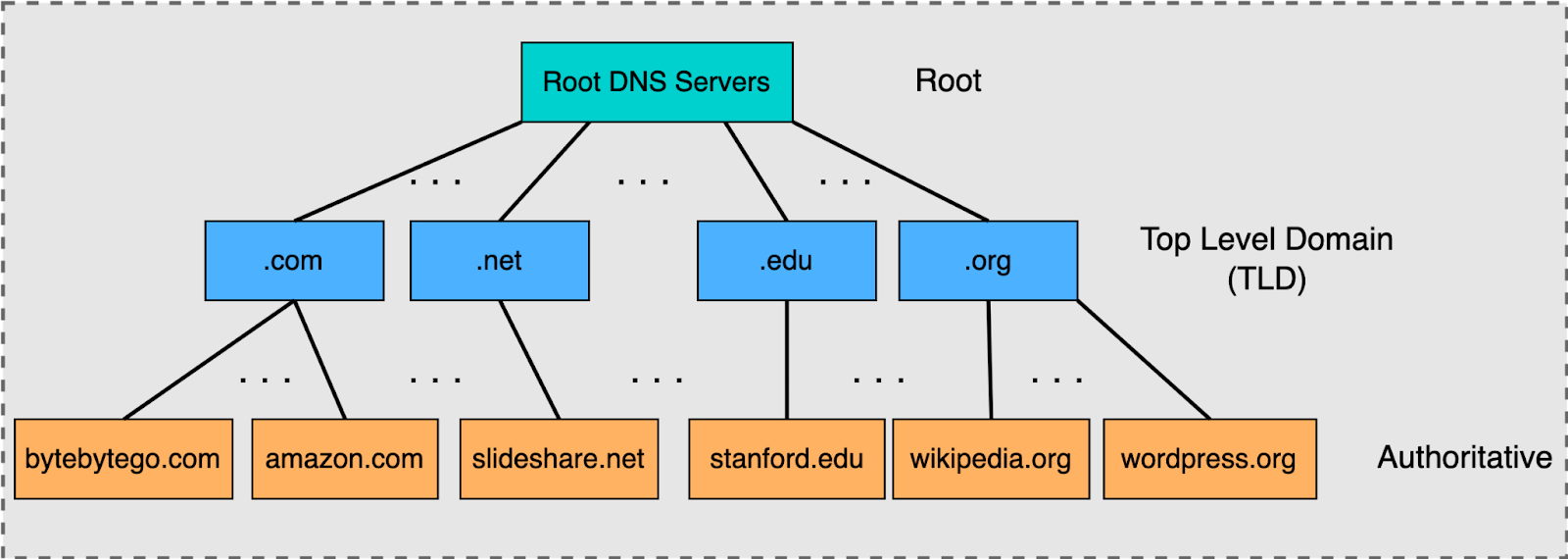
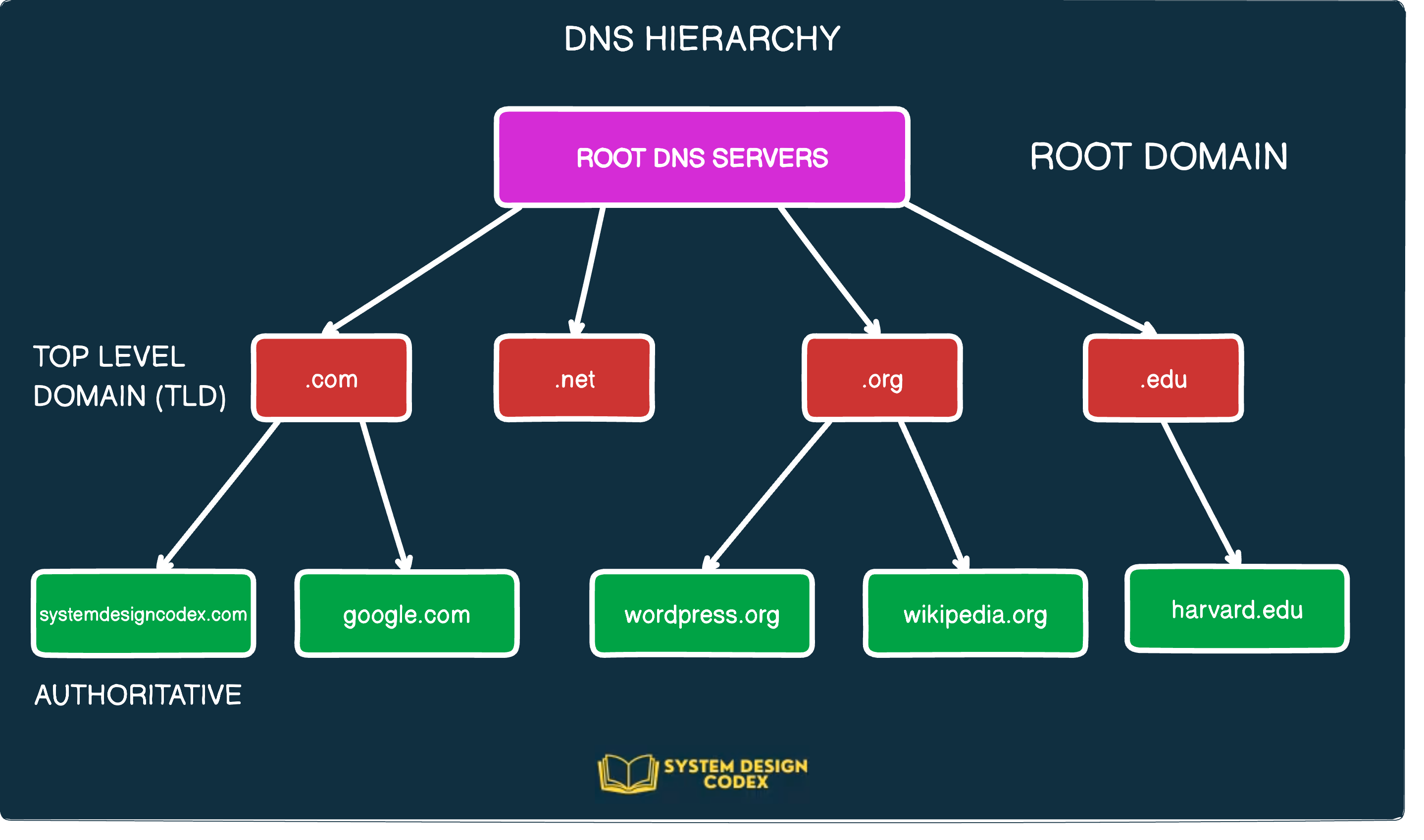
DNS Resolution Happens in Layers
DNS resolution is not a single lookup.
It’s a chain of delegations:

4
Root servers (.)
   ↓
TLD servers (.com, .org, .net)
   ↓
Authoritative servers (google.com)
Let’s walk this hierarchy using dig.
dig . NS — Root Name Servers 🌍
dig . NS
This asks:
“Who is authoritative for the root zone?”
What you’ll see
Servers like
a.root-servers.netManaged by organizations like Verisign, ICANN, etc.
Key points:
There are 13 logical root servers (A–M)
Each is anycasted globally (hundreds of physical instances)
Root servers do not know IPs for google.com
They only know where
.comlives
Think of them as:
“I don’t know the answer, but I know who to ask next.”
dig com NS — TLD Name Servers 📛
dig com NS
This queries the Top-Level Domain (TLD) servers for .com.
What this tells us
.comis managed by VerisignThese servers know:
- Which name servers are authoritative for
google.com
- Which name servers are authoritative for
They still don’t know google.com’s IP
TLD servers act as:
A directory of domains registered under
.com
dig google.com NS — Authoritative Name Servers 🏛️
dig google.com NS
Now we’re asking:
“Who is authoritative for
google.com?”
Output highlights
Name servers like:
  ns1.google.com
  ns2.google.com
  ns3.google.com
  ns4.google.com
These servers:
Are controlled by Google
Hold the actual DNS records
Provide final answers (A, AAAA, MX, TXT, etc.)
This is where truth lives in DNS.
dig google.com — Full DNS Resolution 🔄
dig google.com
This returns:
Arecords (IPv4)Possibly
AAAArecords (IPv6)TTL values
Which server answered the query
But here’s the important part:
Your system did not query root → TLD → authoritative directly.
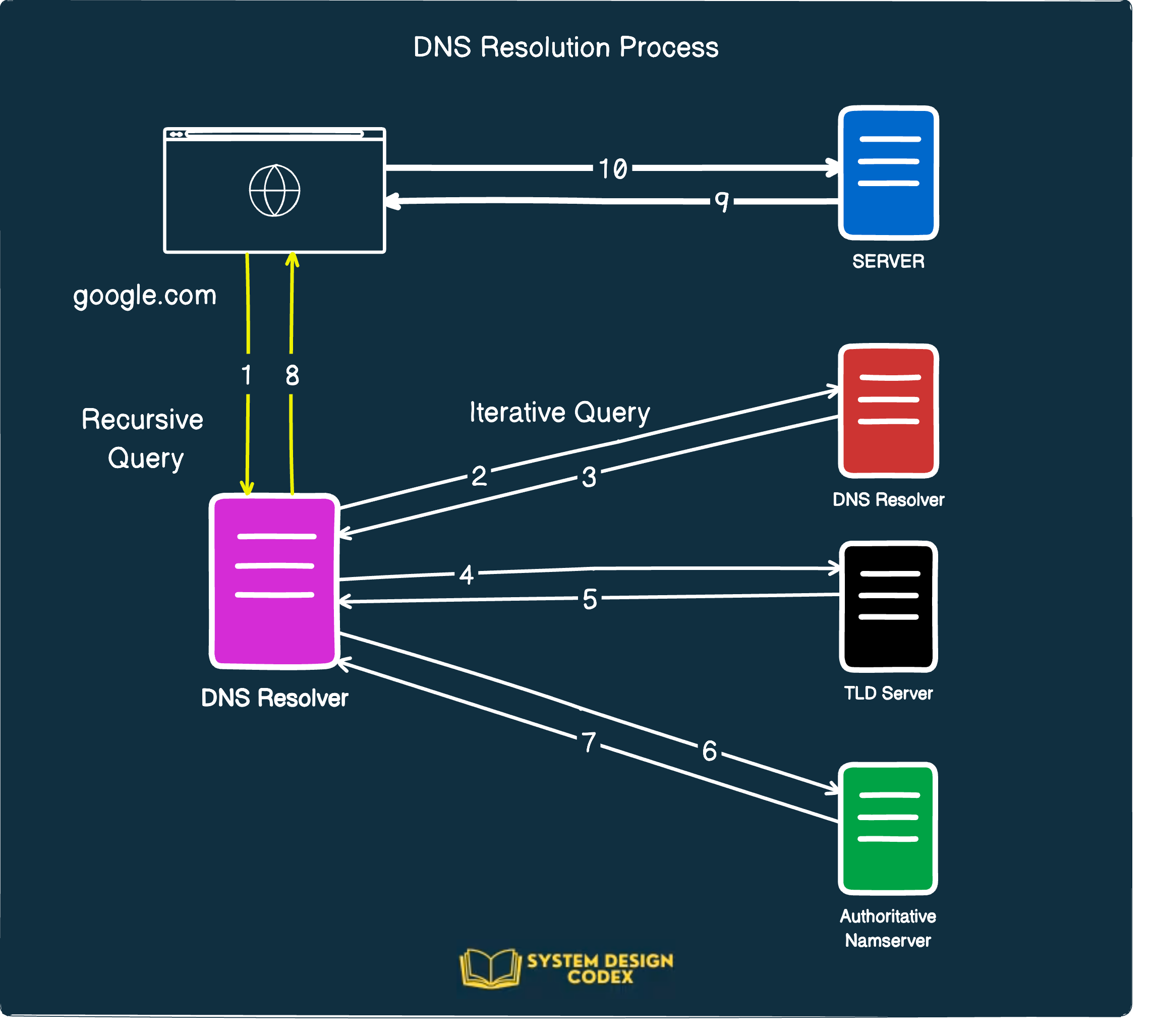
Instead, this was handled by a recursive resolver.
Recursive Resolvers: The Hidden Middleman 🧠
Your laptop/browser typically asks:
ISP DNS
Google DNS (
8.8.8.8)Cloudflare (
1.1.1.1)


4
What the recursive resolver does
Ask root servers for
.comAsk
.comservers forgoogle.comAsk Google’s authoritative servers for IP
Cache the result
Return the IP to your browser
All in milliseconds.
Mapping dig Commands to DNS Stages


4
dig Command | DNS Layer |
dig . NS | Root name servers |
dig com NS | TLD servers |
dig google.com NS | Authoritative servers |
dig google.com | Full resolution via recursive resolver |
This mapping is gold for system design interviews.
Why NS Records Matter in System Design
NS records:
Enable horizontal scaling of DNS
Allow delegation without central coordination
Prevent single points of failure
Make DNS one of the most resilient systems ever built
Design insight:
DNS works because no server needs to know everything.
Connecting DNS to Real Browser Requests 🌐
When you type https://google.com:
DNS resolves
google.com→ IPTCP connection is established
TLS handshake happens
HTTP request is sent
If DNS fails:
- Nothing else even starts
That’s why DNS latency and availability are critical at scale.
Final Takeaways
DNS is a hierarchical, distributed database
diglets you observe DNS like a systems engineerRoot → TLD → Authoritative is the backbone of resolution
Recursive resolvers hide complexity but rely on this hierarchy
Understanding DNS deeply pays off in backend, infra, and SRE roles
Comments
Join the discussionNo comments yet. Be the first to comment.


